Why Consider Alternatives to Obsidian?
Obsidian is a powerful, beloved note-taking app known for its flexibility, local-first approach, and extensive plugin ecosystem. It uses Markdown files stored on your device, giving you complete ownership of your data.
However, there are legitimate reasons you might be looking for alternatives:
- Plugin Fatigue: Obsidian's power comes from plugins, but finding, testing, and maintaining them can become a second job. You might want something that "just works" out of the box.
- Learning Curve: The sheer number of options can be overwhelming. Configuring the perfect workflow takes significant time investment.
- Missing Features: Some features like calendars, code execution, or quick capture require plugins that may not work perfectly or stay maintained.
- Mobile Experience: While improving, Obsidian's mobile app isn't as polished as some alternatives.
- Collaboration: Obsidian is primarily designed for personal use. If you need real-time collaboration, other tools might serve you better.
Whatever your reason, let's explore the top alternatives you might consider in 2025.
Quick Comparison Table
| App | Key Features | Price | Platform |
|---|---|---|---|
| ThoughtsPlus | Instant quick capture, in-note code execution, linked notes graph, NLP calendar | Free forever | Windows |
| Notion | Databases, collaboration, templates, AI features | Free / $10+/mo | All platforms |
| Roam Research | Bidirectional linking, daily notes, graph view | $15/mo | Web, iOS, Android |
| Logseq | Local-first, outliner, PDF annotation, free | Free | All platforms |
| Evernote | Web clipper, powerful search, document scanning | Free / $15+/mo | All platforms |
| Standard Notes | E2E encryption, privacy-focused, open source | Free / $10/mo | All platforms |
| Bear | Beautiful design, hashtag organisation, Markdown | Free / $3/mo | Apple only |
| Craft | Block-based, stunning design, AI assistant | Free / $8/mo | Apple, Web |
| Joplin | Open source, encryption, self-hosted sync | Free | All platforms |
| Apple Notes | Simple, fast, iCloud sync, free | Free | Apple only |

ThoughtsPlus
Our Pick: Best for Developers & Power Users
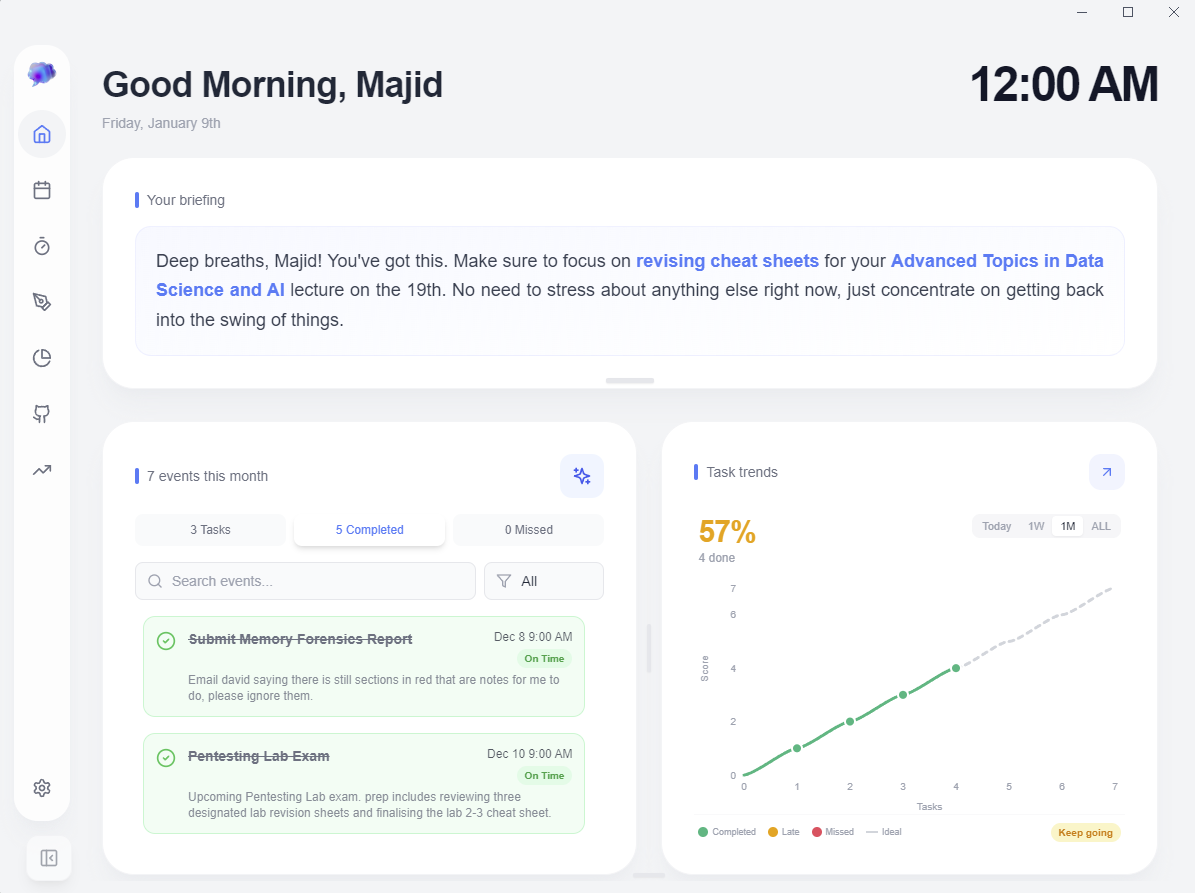
Disclosure: ThoughtsPlus is our product, but we genuinely believe it fills gaps that other apps don't address. Here's an honest look at what makes it different.
I spent years building systems in Obsidian, Logseq, and Notion. The constant downloading of plugins, tweaking configurations, and troubleshooting compatibility issues meant I was often working on my workflow rather than doing actual work. ThoughtsPlus was built to solve that frustration.
What Makes ThoughtsPlus Different
Instant Quick Capture
Press Ctrl+Shift+N from anywhere on your PC and an overlay appears instantly. No waiting for apps to launch, no splash screens. Brain dump in seconds, press Esc to auto-save and dismiss.
Code Execution (Nerdbooks)
Write and execute Python and JavaScript directly in your notes. Unlike Obsidian's code blocks that just display code, ThoughtsPlus actually runs it. Perfect for developers, data scientists, and students.
Built-in NLP Calendar
No plugins required. Press Ctrl+M and type "meeting with John next Tuesday at 3pm". The AI understands and creates the event. Recurring events, late tracking, and categories included.
Truly Local
No account creation. No "offline mode" (because there's no online mode by default). No telemetry. Your notes are just files on your hard drive. Period.
 Nerdbooks: Execute Python directly in your notes
What Early Users Say
"Does as promised, and does it well"
Surprised at how convenient it was, its not alien to other notes apps but still feels unique. You can tell they really thought about the user first.
I expected another generic note taking app, but ThoughtsPlus is actually a powerful tool. The integration with Gemini and Perplexity is the best feature and it turns my fragmented text into structured, formal documentation instantly. It's significantly reduced the time I spend formatting notes. Definitely would recommend a try!
- Completely free, no subscriptions
- Execute Python/JavaScript in notes
- Fastest quick capture of any app
- Built-in calendar with AI (no plugins)
- Linked notes with graph visualisation
- Truly local, no account required
- Open source and transparent
- Windows only (for now)
- Smaller community than Obsidian
- AI features require your own API key
- Newer app, fewer integrations
Pricing
Free Forever
No subscriptions. No premium tiers. No ads. Open source.
Notion
Best for Team Collaboration & Databases
Notion is arguably the most popular productivity app of the 2020s. It combines notes, databases, wikis, and project management into one highly flexible platform.
If you need real-time collaboration or want powerful database features, Notion is hard to beat. However, it's cloud-based, which means your data lives on Notion's servers.
Key Features
- Databases with multiple views (table, board, calendar, gallery)
- Real-time collaboration with comments and mentions
- Extensive template gallery
- Notion AI for writing assistance
- API for integrations and automations
- Incredibly versatile
- Excellent for teams
- Beautiful, polished interface
- Strong mobile apps
- Requires internet connection
- Data stored on their servers
- Can feel slow with large workspaces
- Premium features are expensive
Pricing
Free plan available. Plus: $10/mo. Business: $18/mo per user.
Roam Research
Best for Networked Thinking
Roam Research pioneered the "networked thought" movement that inspired Obsidian. It's an outliner-based tool where every bullet point can be referenced anywhere else.
Roam is beloved by researchers, academics, and people who think in interconnected ideas. Its bidirectional linking and block references are incredibly powerful once you learn them.
Key Features
- Bidirectional links and backlinks
- Block references and embeds
- Daily notes as primary entry point
- Graph overview of all connections
- Powerful query language
- Best-in-class networked thinking
- Block-level referencing
- Strong academic community
- Regular updates
- Expensive ($15/month minimum)
- Steep learning curve
- Cloud-based, no local option
- Outliner format isn't for everyone
Pricing
Pro: $15/month. Believer: $500 for 5 years.
Logseq
Best Free & Open Source Alternative
Logseq is often called "Roam for people who want local files". It's free, open source, and stores everything in Markdown files on your device.
If you love Roam's outliner approach but want local storage and no subscription, Logseq is the closest thing you'll find.
Key Features
- Outliner-based like Roam
- Local Markdown/Org-mode files
- PDF annotation and highlights
- Flashcard system built-in
- Active plugin ecosystem
- Completely free and open source
- Local-first like Obsidian
- Great for daily journaling
- Built-in flashcards
- Outliner-only (no freeform notes)
- Can be slow with large graphs
- Mobile apps need improvement
- Less polished than commercial apps
Pricing
Free. Sync service: $5/month (optional).
Evernote
Best for Web Clipping & Document Search
Evernote is the grandfather of modern note-taking apps. While it's lost some market share, it still excels at certain things: web clipping, document scanning, and searching within attachments.
Key Features
- Best-in-class web clipper
- OCR search in images and PDFs
- Document scanner with mobile app
- Mature, stable platform
- Exceptional web clipping
- Search inside attachments
- Very reliable sync
- Expensive for what you get
- Feels dated compared to newer apps
- No linked notes or graph view
Pricing
Free (limited). Personal: $15/month. Professional: $18/month.
Standard Notes
Best for Privacy & Encryption
Standard Notes is built from the ground up for privacy. It features end-to-end encryption, open-source code, and a 100-year company pledge to stay independent.
Key Features
- End-to-end encryption by default
- Open source and audited
- Markdown and rich text editors
- Sync across unlimited devices
- Self-hosting option available
- Best-in-class encryption
- Truly private and auditable
- Simple, focused interface
- Cross-platform support
- Advanced editors require premium
- No linked notes or graph view
- More basic feature set
Pricing
Free tier available. Productivity: $10/month or $90/year.
Bear
Best for Apple Users Who Love Beautiful Design
Bear is a gorgeous note-taking app exclusive to Apple devices. It's won multiple Apple Design Awards and offers a writing experience that's hard to match.
Key Features
- Stunning, distraction-free design
- Hashtag organisation
- Markdown with rich previews
- Focus mode for writing
- Beautiful iOS-native design
- Simple and fast
- Affordable premium
- Apple only - no Windows/Android
- Limited feature set
- No collaboration
Pricing
Free (basic). Pro: $3/month or $30/year.
Craft
Best for Beautiful Documents & Apple Native
Craft feels like what Notes would be if Apple rebuilt it from scratch in 2024. It's block-based, beautifully designed, and has an AI assistant built in.
Key Features
- Block-based editing
- Stunning export options
- Craft AI assistant
- Native Apple experience
- Most beautiful document output
- Excellent for sharing
- Fast and native
- Limited Windows support
- No bidirectional linking
- Proprietary format
Pricing
Free (limited). Pro: $8/month.
Joplin
Best for Privacy & Self-Hosting
Joplin is the go-to choice if you want open source, end-to-end encryption, and the ability to sync via your own server or cloud storage.
Key Features
- End-to-end encryption
- Self-hosted sync options
- Open source and free
- Evernote import
- Privacy-focused
- Sync anywhere (Dropbox, OneDrive, etc.)
- Active development
- UI feels dated
- Limited graph/linking features
- Less intuitive than commercial apps
Pricing
Free. Cloud sync: $3/month (optional).
Apple Notes
Best for Simplicity (Apple Users)
Don't overlook Apple Notes. It's free, fast, syncs via iCloud, and has quietly become a capable note-taking app with tables, checklists, document scanning, and even Math Notes on iPad.
Key Features
- Instant sync across Apple devices
- Quick Notes from anywhere
- Document scanning built-in
- Completely free
- Zero friction to start
- Incredibly fast
- Surprising depth of features
- Apple ecosystem only
- No linking between notes
- Limited organisation
Pricing
Free with Apple device.
Which Obsidian Alternative Should You Choose?
The best alternative depends on what you value most:
ThoughtsPlus - Execute code in your notes, instant quick capture, free forever.
Notion - Best collaboration and database features.
Roam Research or Logseq - Best bidirectional linking.
Joplin or ThoughtsPlus - Local-first, encrypted, open source.
Bear or Craft - Beautiful, native experience.
ThoughtsPlus, Logseq, Standard Notes, or Apple Notes.
Whatever you choose, the important thing is finding a system that works for you. Don't let productivity tools become another form of procrastination. Pick one, commit to it for a month, and see if it fits your workflow.
Ready to try ThoughtsPlus?
Free, no account required, no strings attached. Download and see if it works for you.