Why Move Away from Notion?
Notion revolutionised the productivity space by combining notes, databases, and wikis into one beautiful package. It's deservedly popular. But it's not perfect for everyone.
Here are the most common reasons people look for Notion alternatives:
- Cloud Dependency: Your notes live on Notion's servers. No internet = no access. While there's an "offline mode", it's limited and not true local-first storage.
- Privacy Concerns: All your data passes through and is stored on Notion's infrastructure. For sensitive personal or business notes, this can be a dealbreaker.
- Subscription Fatigue: The free tier is increasingly limited. For teams, costs escalate quickly ($10-18/user/month).
- Performance Issues: Large workspaces can become sluggish. Notion's web-based architecture means it will never be as fast as native apps.
- Export Limitations: Getting your data out of Notion isn't seamless. You're somewhat locked into their ecosystem.
- Overly Complex: For simple note-taking, Notion can feel like using a sledgehammer to crack a nut.
Whatever your reason, there are excellent alternatives in 2025. Let's explore them.
Quick Comparison Table
| App | Best For | Data Storage | Price |
|---|---|---|---|
| ThoughtsPlus | Quick capture, in-note coding, linked notes | 100% Local | Free forever |
| Obsidian | Power users, linked notes | Local files | Free / $50/yr sync |
| Coda | Database-heavy workflows | Cloud | Free / $10+/mo |
| ClickUp | Project management | Cloud | Free / $7+/mo |
| Airtable | Spreadsheet-database hybrid | Cloud | Free / $20+/mo |
| Anytype | Privacy-conscious, local-first | Local + P2P sync | Free |
| Capacities | Object-based organisation | Cloud | Free / €10/mo |
| Slite | Team knowledge base | Cloud | Free / $8+/mo |
| Monday.com | Work management | Cloud | Free / $9+/mo |
| Standard Notes | E2E encryption, privacy | Local + Sync | Free / $10/mo |

ThoughtsPlus
Our Pick: Best for Privacy & Developers
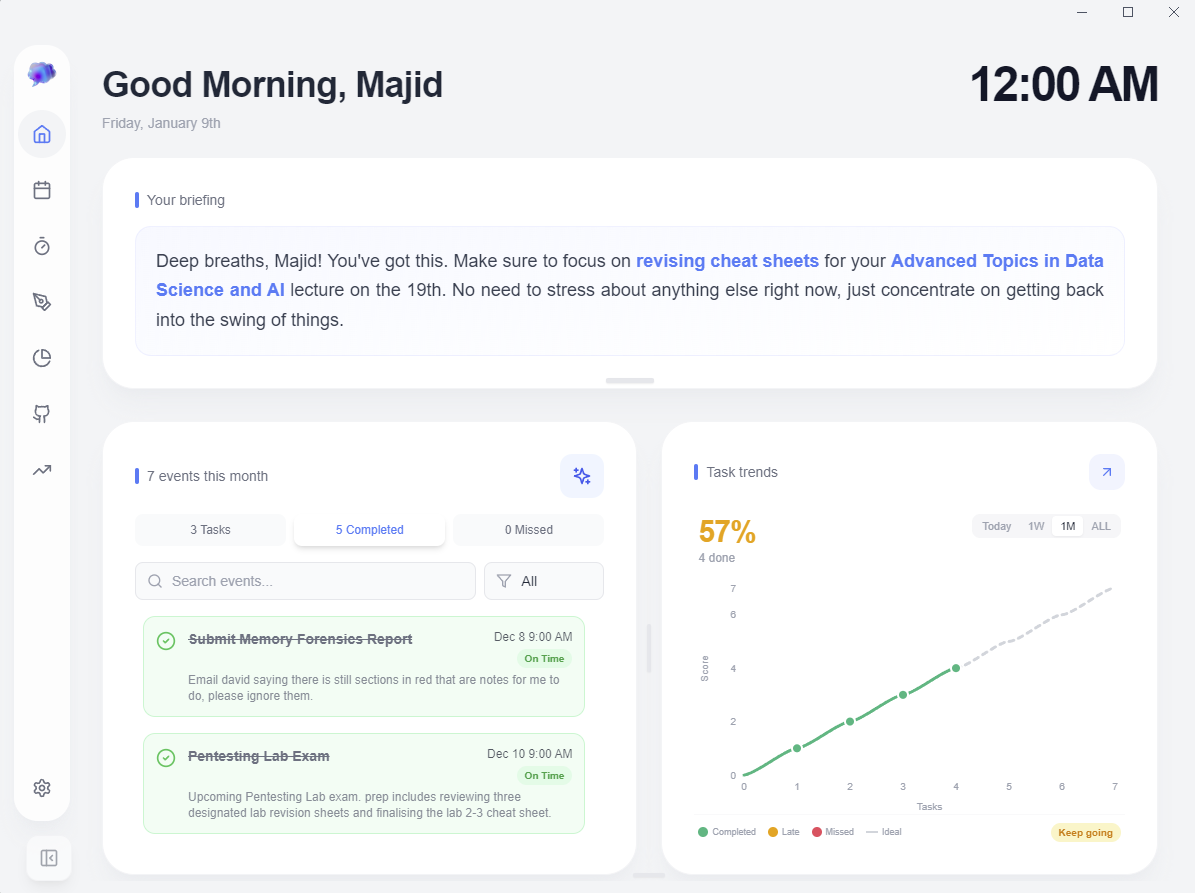
Disclosure: ThoughtsPlus is our product. We built it because we couldn't find what we wanted: Notion's beautiful UI combined with true local storage and developer-friendly features.
If you're leaving Notion because of privacy concerns, subscription costs, or wanting true offline access, ThoughtsPlus addresses all three. Your notes are just files on your hard drive. There's no account to create, no "offline mode" (because there's no online mode by default), and it's completely free.
Why Choose ThoughtsPlus Over Notion
Truly Local Storage
Unlike Notion's cloud-first approach, your notes never leave your device unless you choose to sync via OneDrive. No servers, no accounts, no telemetry.
Instant Quick Capture
Notion requires opening the app, waiting for it to load, creating a page. ThoughtsPlus? Press Ctrl+Shift+N and an overlay appears in milliseconds. Brain dump and dismiss.
Execute Code in Notes
Notion has code blocks that display code. ThoughtsPlus has Nerdbooks that actually run Python and JavaScript. Perfect for developers, students, and data analysts.
Free Forever
No free tier limitations. No premium features locked behind subscriptions. Open source, community-driven, free forever.
 Nerdbooks: Markdown notes with executable Python code in one
place
Nerdbooks: Markdown notes with executable Python code in one
place
What Early Users Say
"Does as promised, and does it well"
Surprised at how convenient it was, its not alien to other notes apps but still feels unique. You can tell they really thought about the user first.
I expected another generic note taking app, but ThoughtsPlus is actually a powerful tool. The integration with Gemini and Perplexity is the best feature and it turns my fragmented text into structured, formal documentation instantly. It's significantly reduced the time I spend formatting notes. Definitely would recommend a try!
- 100% local storage, no cloud required
- Execute Python/JavaScript in notes
- Fastest quick capture available
- Built-in calendar with NLP
- Linked notes with graph view
- Free with no limitations
- Open source
- Windows only currently
- No real-time collaboration
- No database views like Notion
- Smaller ecosystem
Pricing
Free Forever
No subscriptions. No premium tiers. No ads. Open source.
Obsidian
Best for Power Users & Customisation
Obsidian is the powerhouse of local-first note-taking. Like ThoughtsPlus, it stores everything as Markdown files on your device. Unlike Notion, you truly own your data.
Obsidian's strength is its plugin ecosystem. There are plugins for almost everything: Kanban boards, calendars, book tracking, database views. The downside? You'll spend significant time configuring it.
Key Features
- Local Markdown files you own forever
- Massive plugin ecosystem (1000+)
- Bidirectional linking and backlinks
- Graph view of note connections
- Community themes and CSS customisation
- Complete data ownership
- Incredibly customisable
- Large, active community
- Free for personal use
- Steep learning curve
- Plugin management overhead
- Sync costs $50/year
- Less intuitive than Notion
Pricing
Free for personal use. Sync: $50/year. Publish: $100/year. Commercial: $50/user/year.
Coda
Best for Database-Heavy Workflows
Coda is Notion's closest competitor in terms of features. It combines documents and spreadsheets with powerful automation capabilities.
Where Coda shines is in its formula language and automations. You can build complex workflows that trigger based on conditions, send notifications, and update data automatically.
Key Features
- Powerful formula language
- Built-in automations
- Packs (integrations with other tools)
- Real-time collaboration
- More powerful than Notion for automations
- Excellent for team workflows
- Strong integration ecosystem
- Cloud-only, same privacy concerns
- Steeper learning curve
- Can feel overwhelming
Pricing
Free tier available. Pro: $10/mo. Team: $30/user/mo.
ClickUp
Best for Project Management
ClickUp positions itself as "one app to replace them all". It's primarily a project management tool but has expanded into documents, whiteboards, and more.
If you're looking for a Notion alternative that's stronger on task management and project tracking, ClickUp is worth considering.
Key Features
- Comprehensive project management
- Multiple views (List, Board, Gantt, Calendar)
- Time tracking built-in
- Goals and OKR tracking
- ClickUp Docs for documentation
- Feature-rich for project management
- Generous free tier
- Highly customisable
- Can be overwhelming
- Slower than simpler tools
- Feature bloat
Pricing
Free Forever plan. Unlimited: $7/user/mo. Business: $12/user/mo.
Airtable
Best for Spreadsheet-Database Hybrid
Airtable is what you get when you cross a spreadsheet with a database. It's incredibly powerful for structured data and custom workflows.
Key Features
- Spreadsheet interface with database power
- Rich field types (attachments, links, etc.)
- Multiple views per table
- Automations and integrations
- Best-in-class for structured data
- Familiar spreadsheet interface
- Powerful automations
- Expensive at scale
- Not ideal for freeform notes
- Row limits on lower tiers
Pricing
Free (limited). Team: $20/user/mo. Business: $45/user/mo.
Anytype
Best for Privacy with Notion-Like Features
Anytype is what Notion would be if it were local-first and encrypted. It's a newer player but gaining traction fast among privacy-conscious users.
Key Features
- Local-first with P2P sync
- End-to-end encryption
- Object-based organisation
- Similar block-based editing to Notion
- Privacy-focused
- Familiar Notion-like interface
- Free and open source
- Still maturing
- Smaller community
- Some features still in development
Pricing
Free. Self-hosted sync or Anytype network.
Capacities
Best for Object-Based Thinking
Capacities takes a unique approach: everything is an "object" (a person, a book, a meeting, an idea). Objects have types, properties, and relationships.
Key Features
- Object-based structure
- Daily notes integration
- Media management
- Beautiful, focused interface
- Unique, intuitive mental model
- Great for personal knowledge base
- Thoughtfully designed
- Cloud-based
- Smaller ecosystem
- Limited team features
Pricing
Free tier. Pro: €10/month.
Slite
Best for Team Knowledge Bases
Slite focuses specifically on team documentation and knowledge management. It's simpler than Notion but more focused on the docs use case.
Key Features
- Clean, focused interface
- Ask feature (AI search)
- Collections and channels
- Good for SOPs and wikis
- Simpler than Notion
- AI-powered search
- Great onboarding
- Less flexible
- No database features
- Team-focused pricing
Pricing
Free for small teams. Standard: $8/user/mo. Premium: $12.5/user/mo.
Monday.com
Best for Work Management
Monday.com is a work OS that helps teams plan, track, and deliver work. It's more structured than Notion but excellent for managing projects and workflows.
Key Features
- Visual project management
- 200+ integrations
- Automations and workflows
- Workdocs for documentation
- Polished, enterprise-ready
- Excellent for teams
- Strong integrations
- Expensive
- Overkill for personal use
- Complex pricing tiers
Pricing
Free for up to 2 seats. Basic: $9/seat/mo. Standard: $12/seat/mo.
Standard Notes
Best for Privacy & Encryption
Standard Notes is built from the ground up for privacy. It features end-to-end encryption, open-source code, and a 100-year company pledge to stay independent.
Key Features
- End-to-end encryption by default
- Open source and audited
- Markdown and rich text editors
- Sync across unlimited devices
- Self-hosting option available
- Best-in-class encryption
- Truly private and auditable
- Simple, focused interface
- Cross-platform support
- Advanced editors require premium
- No linked notes or graph view
- More basic feature set
Pricing
Free tier available. Productivity: $10/month or $90/year.
Which Notion Alternative Should You Choose?
The right choice depends on your priorities:
ThoughtsPlus or Anytype - Local-first, no cloud dependency.
ThoughtsPlus - Execute code directly in notes.
Obsidian - Endless plugins and themes.
Coda or ClickUp - Collaboration and project management.
Airtable - Spreadsheet-database power.
ThoughtsPlus, Obsidian, or Standard Notes.
If you're leaving Notion because of privacy concerns, costs, or slow performance, we'd obviously love for you to try ThoughtsPlus. But honestly? Any of the local-first options (Obsidian, Logseq, Anytype) will give you true data ownership that Notion simply cannot offer.
Ready to try ThoughtsPlus?
Free, no account required, no strings attached. Just download and start writing.